It’s probably well known, that I have a love/hate relationship with Adobe. Well, not all Adobe, just Lightroom in particular. It’s a product that I love to hate.
And to be fair, it has managed my library for the past 10 years or more, so perhaps it should be a more of a tolerant relationship.
And no, I’m not going to highlight each of the niggles that I have. Just I’m always on the lookout for a better library manager. But recent changes to the suite has caused me to perhaps reconsider my position.
I’ve never been enamoured by their raw converter, much preferring Capture One, Raw Power, or DXO and even Nikon Capture/Studio (in no particular order) to deal with my NEF file conversion.
However some recent changes seem to me to have finally given me the result I was looking for at import. All good.
I’ve often said about the enhancement of images, (these days euphemistically called ‘post-processing’) that I’d happy with a copy of Photoshop 5.5 with its clever—then released—Masking Layers, Brushes and Curves tool for just about all the changes I need to make. (ps. I try not to spend hours in front of screen, pulling first this or then that slider, hoping to produce a prize-winner out of something that I’d normally send to the Trashbin.)
When I was travelling extensively PS5.5 running on a little Libretto Toshiba notebook did all of the heavy lifting for me. And given the size of the Libretto (it was only just a little larger in size to an Iphone 15 Max) just fitted in one palm, it wasn’t a bad effort. (How times change)
And I was much happier to move to the first Macbook Air with a decent size keyboard.
But… Back to Adobe
Lightroom in particular.
To keep up with the latest and greatest, of course, Adobe have introduced several AI components into the Lr suite. One of which is the Generative AI Removal tool. Swipe over the ‘offending’ intrusion into the perfect composition, hit the “Apply Button” pause to take a breath, and there before your very eyes like some magician’s trick, ‘it’s’ Gone… And just to be sure, new buttons offer three. (Count them. 3 ) choices of result.
Wannaseehowitworks? Well I did too.
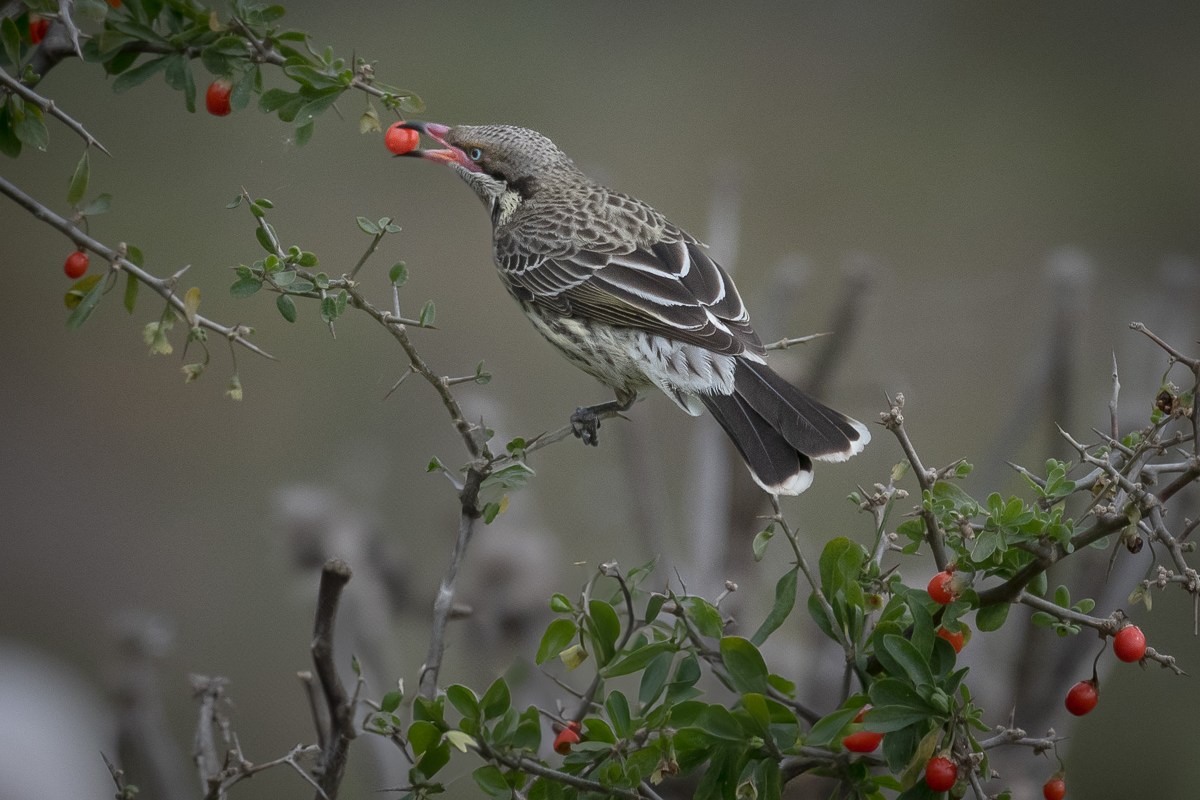
As it turned out while I was working with some Spiny-cheeked Honeyeaters on boxthorn (see last week’s post) a clever little Sparrow landed on the bush just in front of my moment.
Yep, I could have cropped around it, and neither you or I would have had to wade all the way down here, But I thought. Why not?
Why not indeed, so.
I did.

With and Without Sparrow. Version #1 with some space under the bird and a clever addition to the branch

Version #2 filling in the space. Version #3 creating a nice branch that can support the bird.
You can click on the pics to get a full size view of each pair.
I know. Scary.
And of course no one is every going to believe anything else I post again. 🙂
Some, suspicious that we are, might even be wondering. Did he actually paste the Sparrow in from another shot? 🙂
Like many of the ‘new’ features using AI, personally I don’t find the need compelling. But for those days when the wind is howling outside, the rain is pitching down and I’ve crawled out from under the doona long enough to make a cup of the Earl of Grey, it does while away a bit of time.
Here’s to some warm sunny Spring days soon.
 Birds as Poetry —— Just because I WANDER doesn't mean I'm LOST
An interesting discussion and to see the results, David!
Whilst I do have LR I have only used it once or twice, simply because
‘I just don’t like or ‘get it” That probably says more about me than LR!
Perhaps I should have another look!
LikeLiked by 1 person
HI Dave,
Yes, tis a bit horses for courses thing. My main use is to manage the photos file. I have used databases back to a programme called “Shoebox” It was so clever. When we demoed it, and asked it to find a “red, macaw, jungle’ etc” it would uneeringly bring up a wonderful pic of a Macaw. How cool.
Then when asked to find say, “Bride, White, Dress, Sunset, Beach”, it would uneeringly bring up…. the same A of the Macaw. 🙂 It never went to version 2 infact i don’t think it went to 1.0.0.01.2 Its main claim to fame was images were stored on cd and a bulky great jukebox (get the ‘box’ connection) and it could slip those discs in and out a treat. 🙂
Being Mac based, Apple’s Aperture was the ultimate solution. (It came out about the same times the Lr 1.
It was a creative’s dream, as it was not modular, but everything was integrated you could keyword, adjust sliders, organise in folders and all, without swapping in and out of modules, ala Lr. But. It pased too, and Lr became our asset manager.
I rather like the way the latest Lr does not use the Cloud, but manages the images on my diskdrives. Simpler interface than the “Classic version” and as I pay for the suite, I do have options.
Normally don’t mess with the AI cleverness, but its been a bit indoors days of late.
Seeya
LikeLike
It really is remarkably good, isn’t it. Great fun to test the system out on a horrible day and the only loser is the Sparrow, which was hoping for lasting fame.
LikeLiked by 1 person
HI Eleanor, at the way things are going, I’m going to run out of things to test before I run out of miserable days.
At least I guess I’m not on the Derwent in Tassie
LikeLike
Yes, it’s pretty dire, but Tassie is worse off than we are. My niece is on alert to evacuate if necessary.
Poor birds – you wonder how many nests and clutches will be lost in these winds.
LikeLiked by 1 person
Ohh Hope that your niece is ok. Some things are so unpredictable.
We’ve only been out the once and didn’t see any major catastrophes among the few nesting birds we’ve been watching.
A Magpie pair that seem to be late starters must be congratulating themselves that they haven’t had to endure the weather.
LikeLike